Java 9 has been released on September 21 officially, Eclipse is supporting Java 9 from Eclipse Oxygen.1a (4.7.1a), Lets jump into module world..!!!
Download Java 9 from here, and add it to Eclipse Installed JRE’s as below
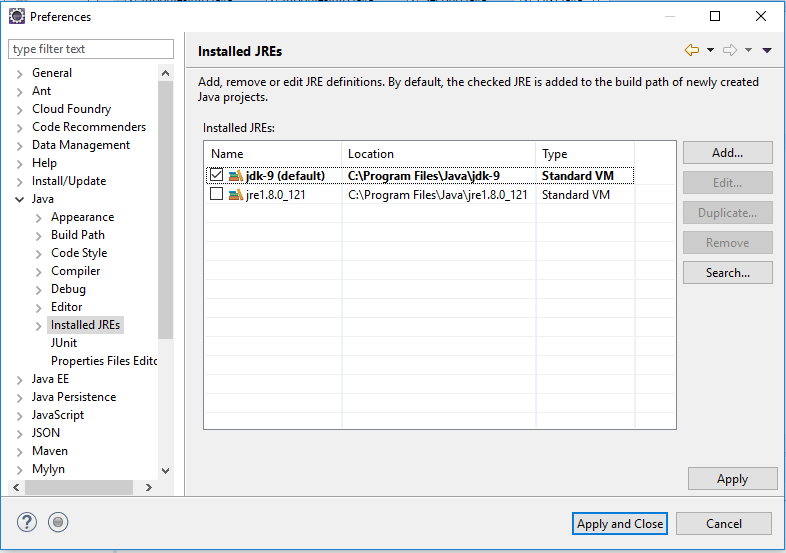
That’s it, we are good to write Java 9 module programs in Eclipse.
- Create First java project and add module-info.java to it, right click on the project
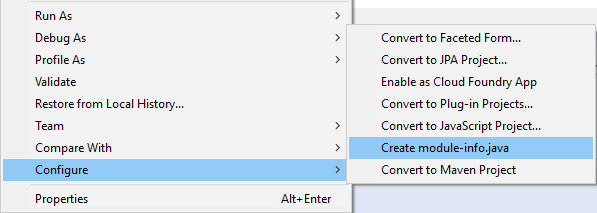
module-info.java
module first {

}
Module should start with keyword module followed by its name. currently it doesn’t requires anything or it doesn’t export anything.
2. Let’s create Second java project,
module-info.java
module second {
exports second; --<em> second module is exporting a package "second"</em>
}
Second.java — create a simple Java class with public sayHello() method in second package
package second;

public class Second {
public void sayHello() {
System.out.println("Welcome to module world..!!");
}
}
Second java class will be available to other modules, as it is exporting second package.
3. Update first module – module-info.java as below
module first {
requires second;
}
Now first module requires second module, but it will fail with module can not be resolved compilation error
“second cannot be resolved to a module”
we need to add second module as dependency to first module.

Check the new thing called modulepath
3. Create FirstTest.java in first package as below
package first;

import second.Second; // we are accessing Second.java from second module

public class FirstTest {

public static void main(String[] args) {
Second second = new Second();
second.sayHello();
}
}
Running the above would print “Welcome to module world..!!”
source code can be found at Github
 Java2practice
Leave a comment