This post explains how to integrate dbt MCP (Model Context Protocol) with Claude Desktop, running completely on your local machine — no dbt Cloud required.
We’ll walk through setup, configuration, performance improvements, and even querying metrics directly from Claude.
1. Install Claude for Desktop
Download Claude Desktop from
👉 https://claude.ai/download
Reference documentation:
👉 dbt AI MCP Setup Guide
2. Use the dbt Models Repository
Example dbt project used in this demo:
👉 https://github.com/rameshcharykotha/dbt-sematic-models-demo
3. Configure Environment Variables
Create a file named config.env and add the following values:
DISABLE_SEMANTIC_LAYER=true
DISABLE_DISCOVERY=true
DBT_CLI_TIMEOUT=300
DBT_PROJECT_DIR=C:/Users/rames/IdeaProjects/dbt-sematic-models-demo
DBT_PATH=C:/Users/rames/AppData/Local/Programs/Python/Python311/Scripts/dbt.exe
4. Initial Claude Desktop Configuration
In your claude_desktop_config.json file, add the dbt MCP setup as shown below:
{
  "mcpServers": {
    "dbt-mcp": {
      "command": "uvx",
      "args": [
        "--env-file",
        "C:/Users/rames/.dbt/config.env",
        "dbt-mcp"
      ]
    }
  }
}
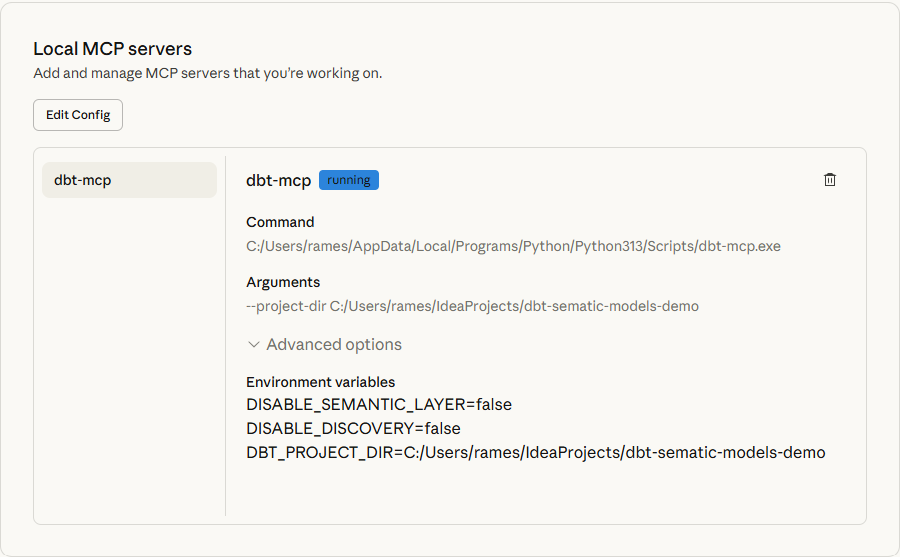
Verify dbt mcp is running
5. Observing the Initial Run
When running dbt commands from Claude (e.g., run), you might see long response times.
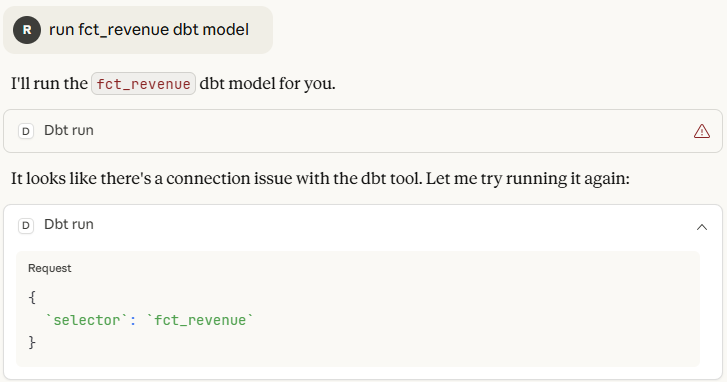
Sample logs:
Claude request timed out after 4 minutes.
Each time Claude invokes dbt-mcp via uvx, it reinstalls dbt and dependencies.
This happens because uvx dynamically creates a temporary Python environment and installs dbt-mcp every time it runs — even when cached.
6. Optimize Performance with a Local dbt Installation
To fix this, install dbt MCP and dbt locally:
pip install dbt-mcp dbt-core dbt-postgres
Then update your Claude configuration to directly use your local dbt-mcp.exe instead of uvx.
{
  "mcpServers": {
    "dbt-mcp": {
      "command": "C:/Users/rames/AppData/Local/Programs/Python/Python313/Scripts/dbt-mcp.exe",
      "args": [
        "--project-dir",
        "C:/Users/rames/IdeaProjects/dbt-sematic-models-demo"
      ],
      "env": {
        "DISABLE_SEMANTIC_LAYER": "false",
        "DISABLE_DISCOVERY": "false",
        "DBT_PROJECT_DIR": "C:/Users/rames/IdeaProjects/dbt-sematic-models-demo"
      }
    }
  }
}
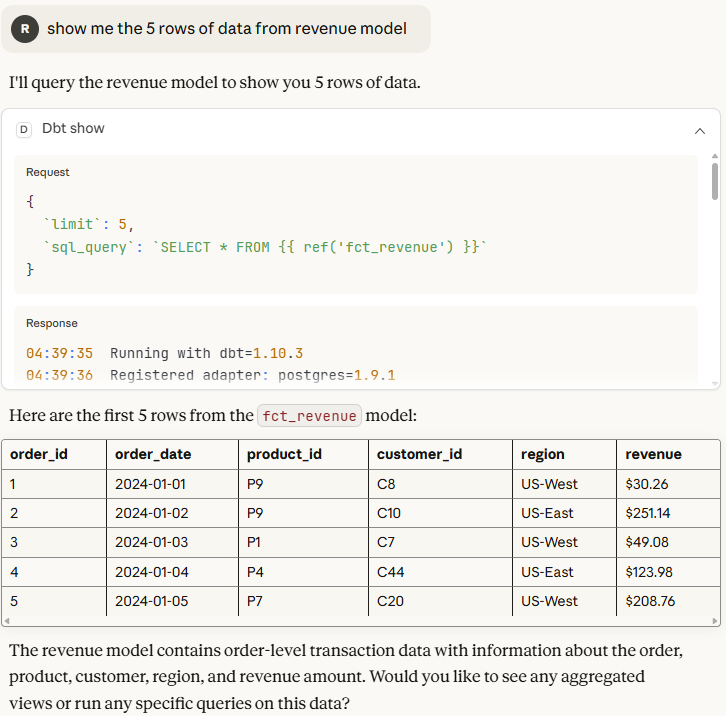
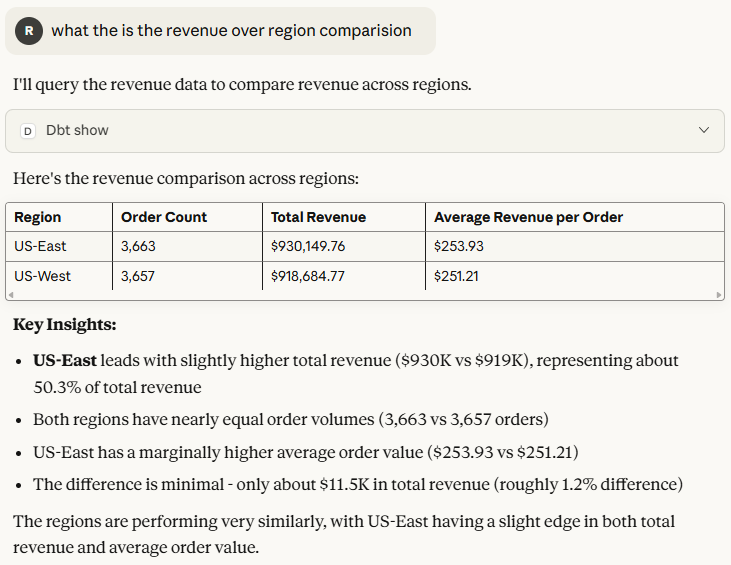
7. Improved Response Times
With the local setup, dbt MCP responds in under 10 seconds compared to several minutes earlier.
Sample output from Claude:
8. Summary
- uvx method works but is slow — it recreates the environment each time.
- Local installation (via pip) is 10× faster.
- You can now run dbt models, metrics, and semantic layer queries directly inside Claude Desktop.
9. Troubleshooting Common Errors
Here are some issues you might run into while setting up dbt MCP locally:
a. Timeout Error
McpError: Request timed out
Claude’s tool invocation timeout is around 4 minutes.
If dbt takes longer (especially with uvx), switch to the local dbt-mcp executable approach described above.
b. Missing Environment Variables
DBT_HOST environment variable is required
DBT_PROD_ENV_ID environment variable is required
DBT_TOKEN environment variable is required
These appear when DISABLE_SEMANTIC_LAYER or DISABLE_DISCOVERY are not set to true.
If you’re working locally (without dbt Cloud), make sure these are disabled:
DISABLE_SEMANTIC_LAYER=true
DISABLE_DISCOVERY=true
c. Project Directory Not Found
DBT_PROJECT_DIR environment variable is required
Make sure you’ve added the path to your dbt models directory:
DBT_PROJECT_DIR=C:/Users/rames/IdeaProjects/dbt-sematic-models-demo
and that this path matches both your .env and claude_desktop_config.json.
d. dbt-mcp Not Found
If you see:
'dbt-mcp' is not recognized as an internal or external command
Ensure dbt-mcp is installed and accessible:
pip install dbt-mcp
where dbt-mcp
Then use the full path in your Claude config’s "command" property.
 Java2practice
Leave a comment